Serverless file converter
An image and document converter on AWS, with a free guest demo.
Built by our co-founder. Will Soltani built it as his own project and public demo, not for a client. The code is public.
Layers involved: Security and reliability, Cloud and platform and Back end and APIs
Built with: AWS Lambda (container image), Step Functions, S3, DynamoDB, KMS, Cognito, CloudWatch, AWS CDK, GitHub Actions, Next.js on App Runner, sharp, Pillow, PyMuPDF, LibreOffice
Try it at soltani.org/testSource on GitHub
What it does
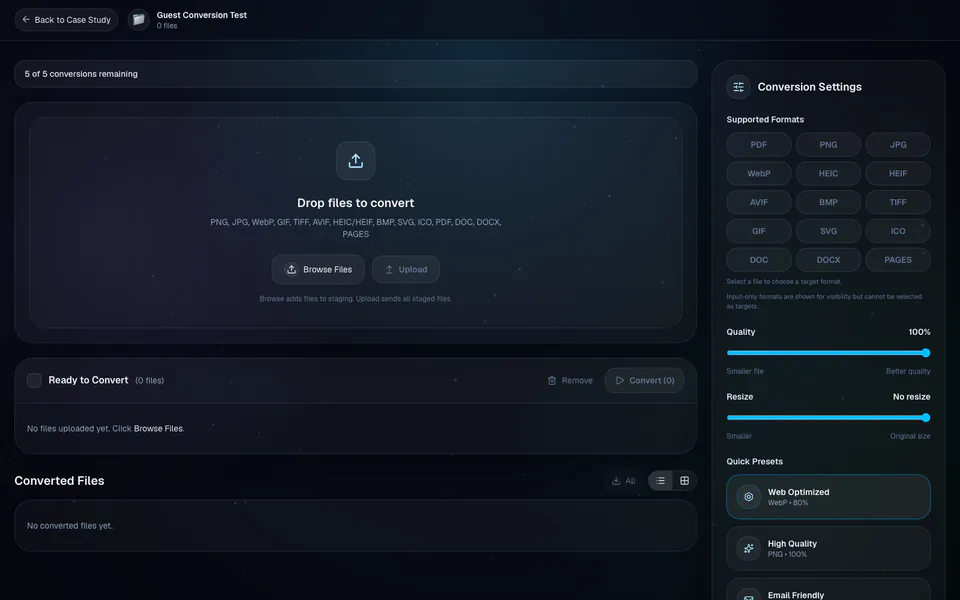
It converts images, PDFs and Word or Pages documents between formats. Images convert to 12 formats, including PNG, JPG, WebP, AVIF, HEIC and PDF. A PDF becomes images, one per page, zipped when there are several. Word and Pages files become a PDF or images.
Each file gets its own target format, quality and resize settings, or a preset such as WebP at quality 80 for the web.
Anyone can try it as a guest at soltani.org/test, with five conversions per session, the same formats and the same pipeline. Signing in raises the limit to ten and adds a PDF form-fill editor.
How it works
- The browser asks the API for an upload. The API answers with a signed S3 link that lasts 300 seconds, with the file’s content type signed in.
- The browser sends the file straight to a private S3 bucket. A completion step reads the first 64 KB, detects the real type from the bytes, rejects unsupported files and records the file in DynamoDB.
- A convert request carries up to 25 conversions. Each one is checked: the file exists, belongs to the caller and can become the chosen format. Then it reserves one unit of quota and starts its own Step Functions execution, four at a time.
- Step Functions runs a single task: a container Lambda with Node 20, Python 3 and LibreOffice inside. sharp does most image work; Pillow handles HEIC, HEIF, AVIF, BMP and ICO; PyMuPDF turns PDF pages into images; LibreOffice turns Word files into PDFs. A Pages file becomes a PDF from the preview stored inside it.
- Results go to a separate encrypted bucket and their status to DynamoDB. The page checks every 2 seconds, backing off to 10, while anything is still processing.
- Downloads use a fresh signed link that lasts 60 seconds.
- Sign-in is Amazon Cognito with the authorization-code flow and PKCE. Each guest session gets its own isolated space.
- Storage, the worker and the workflow are defined in the AWS CDK and deploy from GitHub Actions through OIDC. The Next.js front end runs on AWS App Runner.
Decisions and tradeoffs
Upload straight to S3
Files go from the browser to S3 by a signed link, never through the web server. The tradeoff: S3 does not enforce the 250 MB cap here, so the cap is checked on the size the browser declares when the link is issued.
Trust the bytes, not the name
The real type comes from the file’s first bytes, so a renamed file is caught. Unsupported types are turned away with a 415.
Step Functions around one Lambda
A workflow with a single task looks like extra machinery, but it adds automatic retries on Lambda service errors, with growing waits between tries, and a five-minute timeout. The worker has no retry code of its own.
One container for every engine
Node, Python and LibreOffice ship in one image, so one worker handles every format. It runs with a fixed 2,048 MB and a two-minute timeout. Cold starts were not measured.
Reserve quota first
One conditional DynamoDB update reserves a unit before the job starts, so parallel requests can’t overrun the limit. The cost: if starting the job fails, that unit is not refunded.
Pages files from their own preview
A .pages file carries a preview PDF or preview images. The converter uses those instead of a full Pages renderer, so the output is the preview, not a full layout render.
Security
- Both buckets are encrypted with SSE-KMS under one customer-managed key with rotation on. They accept TLS only, block all public access and keep versions.
- Upload links last 300 seconds and download links 60.
- Every file is typed from its bytes, and unsupported types are rejected.
- SVG files are cleaned before rendering: scripts, entity declarations, foreignObject, event-handler attributes and external references are removed.
- The sign-in token is verified by the app’s middleware and again in every API route, and every file row is keyed to its owner.
- Tokens live in httpOnly, SameSite=Lax cookies, Secure in production.
- The worker can read the upload bucket, write the output bucket, use the table and the KMS key, and nothing else.
- Browser requests to the buckets are limited to soltani.org, www.soltani.org and localhost:3000.
What can go wrong
- Uploads are not scanned for viruses or malware.
- There is no rate limiting beyond the per-user quota.
- Two CloudWatch alarms watch worker errors and failed workflow runs, but no notification is attached, so nobody is paged.
- Guest files don’t expire on their own. They stay until someone deletes them.
- If a job fails to start after its quota unit is reserved, the unit is not refunded.
- The 250 MB cap is checked on the declared size. S3 does not enforce it.
- There is no refresh-token flow, so a signed-in user signs in again when the token expires.
Next step
Try it as a guest at soltani.org/test, or read the code on GitHub. To build something like it, start a project.
Next case study: Scroll-film pipeline